Agentic coding for economists
Introduction
This is an opinionated, brief intro to agentic coding for economists. I skip motivation - assuming the reader already has an interest in agentic coding and is convinced of its utility for economics research.
The focus of this introduction is a practical introduction to modern AI, so that the reader reaches a point quickly of being able to make use of these tools for their projects.
A few caveats:
- This is a living document: one which I intend to improve over time. What you're seeing right now is probably a v1.
- In almost all of my writing I don't use any AI (feel free to stick my newsletters, tweets and articles through Pangram). Here, however, to get this out efficiently in response to a deadline, I've produced this primer with a fair bit of AI help. Consider yourselves warned, Pangram police!
1. What do we mean when we say AI?
AI is a broad term comprising many subconcepts: computer vision, robotics, reinforcement learning, and even philosophy of mind.
When we talk about AI here, we mean something much narrower: applications of large language models (LLMs), the kind of model underneath ChatGPT and Claude. You don't need to know how these models are trained, but it helps to know roughly what one does. An LLM takes some text and predicts what comes next. Give it "The effect of the program was" and it might continue with "positive". It works in small pieces called tokens, each often a word or part of a word: it predicts the next token, adds it to the text, and repeats.
Works out how likely each possible next token is.
- positive41%
- smalldrawn22%
- large12%
- not8%
- all other tokens17%
It had a 22% chance. Another run could draw positive instead.
- Step 1 The effect of the program was small
- Step 2 The effect of the program was small for
- Step 3 The effect of the program was small for particip
- Step 4 The effect of the program was small for participants
- … and so on, one draw at a time. Each box or underline marks one token; a token can be part of a word, as in steps 3 and 4.
You reach a model through software, and that software determines much of what the model can do for you. The most familiar is chat interfaces like ChatGPT and Claude: you type a question, perhaps attach a paper, and copy the answer into Overleaf or Stata yourself. Another is the API, where a script sends requests to the model, for example to classify each document in a large set.
Type each message and read each reply.
Shows the chat page. Sends each message and displays each reply.
Write and run the script, then check what it saved.
Sends a request for each document and saves each response.
Turns your conversation into a request to the model.
Passes your script's request to the model.
Reads the request and writes the response.
Shared: a Claude model on Anthropic's servers, and you directing the work.
Different: you type and read in a chat page, or you write a script that sends requests and saves responses.
The same model can still answer differently by route: the instructions and settings sent with a request can differ.
The third is a coding agent, such as Codex or Claude Code, which is our focus. An agent is software that gives the model tools and lets it keep going: it takes an action, looks at the result, and decides on the next step. With the access you grant, those tools can read and edit the files in a project folder, run code, and pull in material from connected systems such as your email.
Give the task and decide what the agent may access.
an LLM
a coding agent: Codex, Claude Code
files, running code, connected systems: within the access you grant
After step 4, the model either requests another action, back to step 1, or writes its report.
Read what it reports, and decide what happens next.
Suppose a table in your paper no longer matches what the code produces. An agent working in the project folder can open the script, run it, compare the output against the draft, and report where the two diverge. You copy nothing between applications, but you still read what it found and decide what to change.
Ask: "Why does the table in my paper differ from the script's output?"
You paste it into the chat.
Agent software opens it.
You run it, then paste the output.
Agent software runs it and reads the output.
You paste it into the chat.
Agent software reads it.
Check the comparison, then decide what to change. Neither workflow guarantees it is right.
The agent could only work from what it had actually read: the script, the output, the draft. So the practical question is what information is actually available to the model as it works: the subject of the next section.
2. Tokens, context, and memory
In Section 1, we covered language models, the applications built around them, and how agents use tools to work on a project. In this section, we look at the information a model has available while it works: what enters its context, how that context grows, and what can carry forward into later work. This helps explain why the same agent can respond differently depending on the material it has been given.
The material available for the model's next response is its context. You can think of it as working memory, as long as you keep the analogy loose. The application supplies instructions, along with descriptions of the tools the agent can use. The conversation adds your messages and the assistant's replies. And when the agent uses a tool, what the tool returns is added as well: the contents of a file it read, the results of a search, or the output of a command it ran.
Access is a separate matter. Giving an agent access to a project folder lets it look for and read files. It does not put every file in the folder into context. Suppose the folder holds twenty files, and the agent opens one script and runs it. The script's contents and the output it returned are now in context. The other nineteen files are still only available, like articles on your desk that you have not read yet.
- 1 script: opened and run
- 19 files: available, not read
All 20 files stay in the folder. Reading copies a file's contents; it does not move the file.
Supplied by the application.
Your messages and the assistant's replies.
- A copy of the script's contents
- The output from running it
Nothing from the other 19 files is in context.
As the work continues, that material accumulates: more messages, more replies, more tool results. The amount that fits into a single model interaction is limited, and this capacity is called the context window. Its size is measured in tokens, the small pieces of text from Section 1.
Split checked with one encoding, cl100k_base; other tokenizers divide the sentence differently. The spaces between words belong to tokens and are not drawn.
-
Start of a conversationInstructions and tool descriptions are already there.
-
After some workMessages, replies, and tool results have been added.
-
After a long sessionMore of each. Little room is left.
Schematic: the widths are not real token counts.
Each model has a finite context window, and these windows have grown substantially. Claude reached 100,000 tokens in May 2023, up from 9,000. As of October 2026, the latest Opus and Sonnet models in Claude Code have one-million-token windows, though the window available to you depends on the model and configuration.
To put that in familiar terms, suppose you ask the agent to read a 10,000-word economics paper. At roughly three English words per four tokens, its text would take around 13,000 tokens. Reading ten such papers into the conversation would use roughly 130,000 tokens, or 13% of a million-token window, before adding instructions, your discussion, code, and other tool results. This is a sense of scale, not a measured paper count: equations, tables, and how a PDF is read can change the total.

Captured October 12, 2026. Example values; capacity depends on the model and configuration.
Open the full-size breakdown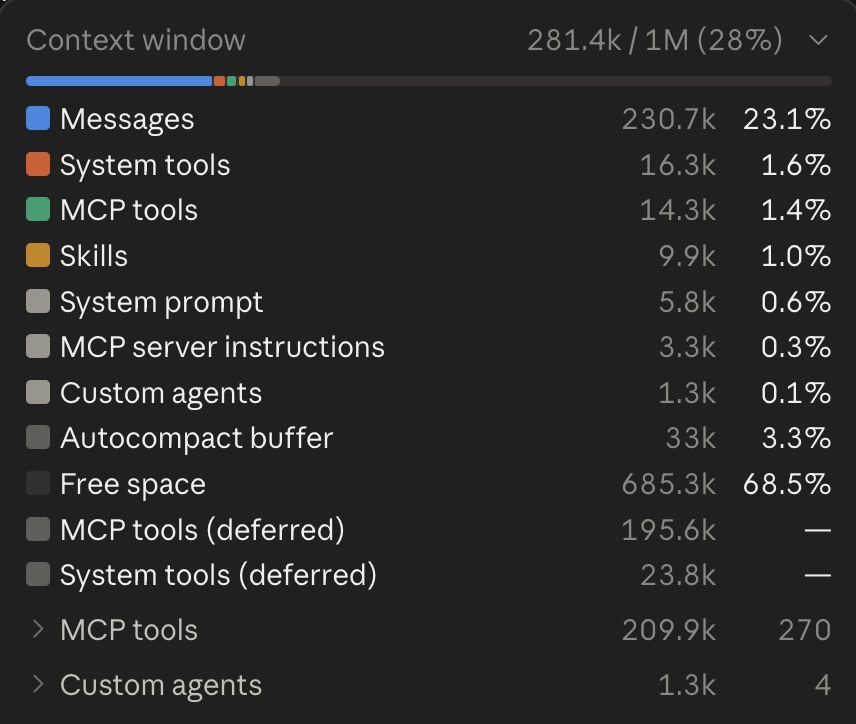
A growing context can create problems even before it fills up because models tend to perform worse as the context gets longer, as is demonstrated by the below figure.

Source: Anthropic, March 13, 2026, claude.com/resources/articles/1m-context-ga. Benchmark: MRCR v2, 8-needle. A historical benchmark illustration, not a current model ranking.
Open the full-size chart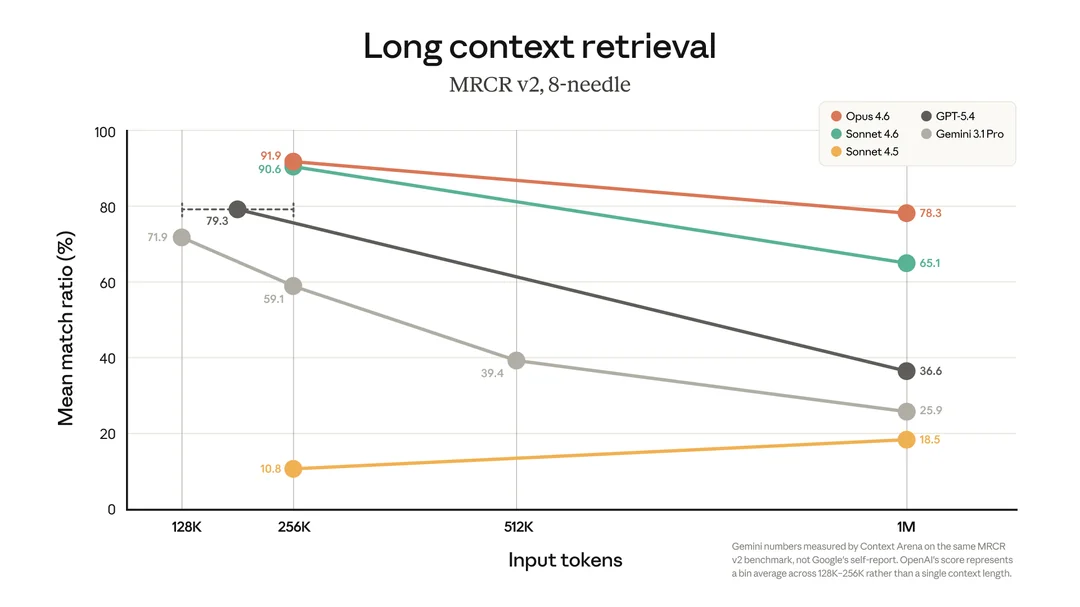
When the context window nears its limit, applications can automatically trigger a process called compaction. A model summarizes the relevant parts of the conversation, such as the goal, the current state of the work, and the main decisions. That summary is carried forward in place of the earlier messages and tool results, while some context, including the application's instructions, stays as it was. The window is no larger, but much of it is free again for new work, and you continue in the same conversation. The summary is a selection, not a complete record.
This example assumes a window that holds 1 million tokens (k = 1,000 tokens). The point at which compaction starts and the size of the summary vary in practice.
Read the bars for proportions. The boxes list what is in context; their sizes do not represent token counts.
- Your messages80k
- The assistant's replies220k
- Contents of files it read400k
- Output from tools it ran220k
Both are the same window with the same capacity. Applications differ in what else they keep, and compaction does not change the files saved in your project.
That shorter account can lose distinctions you care about. Suppose that during a long session you decided to leave out the survey years before 2010, because the survey question was reworded that year, and you left one robustness check open. "Discussed dropping the early years" leaves open whether you agreed, declined, or postponed the decision. Even an accurate "drop the years before 2010" omits the reason and the open check. The reason matters if the agent later suggests adding those years back to enlarge the sample.
- Decision
- Leave out the survey years before 2010.
- Reason
- The survey question was reworded in 2010.
- Still open
- One robustness check.
"Discussed dropping the early years."
- Decisionunclearagreed, declined, or postponed?
- Reasonmissing
- Still openmissing
"Drop the years before 2010."
- Decisionkept
- Reasonmissing
- Still openmissing
Some systems keep a compressed form you cannot read, so there may be no summary to inspect.
Because LLMs have limited context windows and hit these compaction events, a common practice is to keep a record of the state of your work on your file system. This could just be a progress log of tasks being done. Or, before starting a big project, you could use the agentic coding tool to create a document in your project folder that records what you're brainstorming and planning.
That document stays on your file system through a compaction event. The tool can then tell its future self in the summary, "Take a look at this file where we're writing out the brainstorm." By reading the file, it can pick up the details of what you were working on, even if those details are no longer in the conversation's context.
saved files
what the model works from
You settle a decision, its reason, and what is still open.
The conversation ends. The note stays in the folder.
Already here: instructions, tool descriptions, your new message, perhaps selected memory. The note's contents are not.
The note is still in the folder.
The decision, its reason, and the open question are in context again.
In these first two sections, we've explained at a basic level what is going on with coding agents like Claude Code and Codex. In the next section, we'll get you set up to actually begin working with them.
3. Setup
In this section, let's get practical. Which agentic coding tool should you use? How much should you pay for it? What are some of the basics you need to understand in order to use it?
Claude Code vs Codex
I could say a lot here, but as a practical suggestion: you can use either tool - they're both great. Ideally, you'd have both, but you should just start with one.
I prefer Codex, because its desktop app is much better than Claude's, but Opus 5.5 seems to currently be the best value (as of Oct 13, 2026).
CLI vs VS Code vs Desktop App
There are many interfaces through which to use coding agents, but the three most common options are the command line interface, as a VS Code extension, or within the coding agent's desktop app.
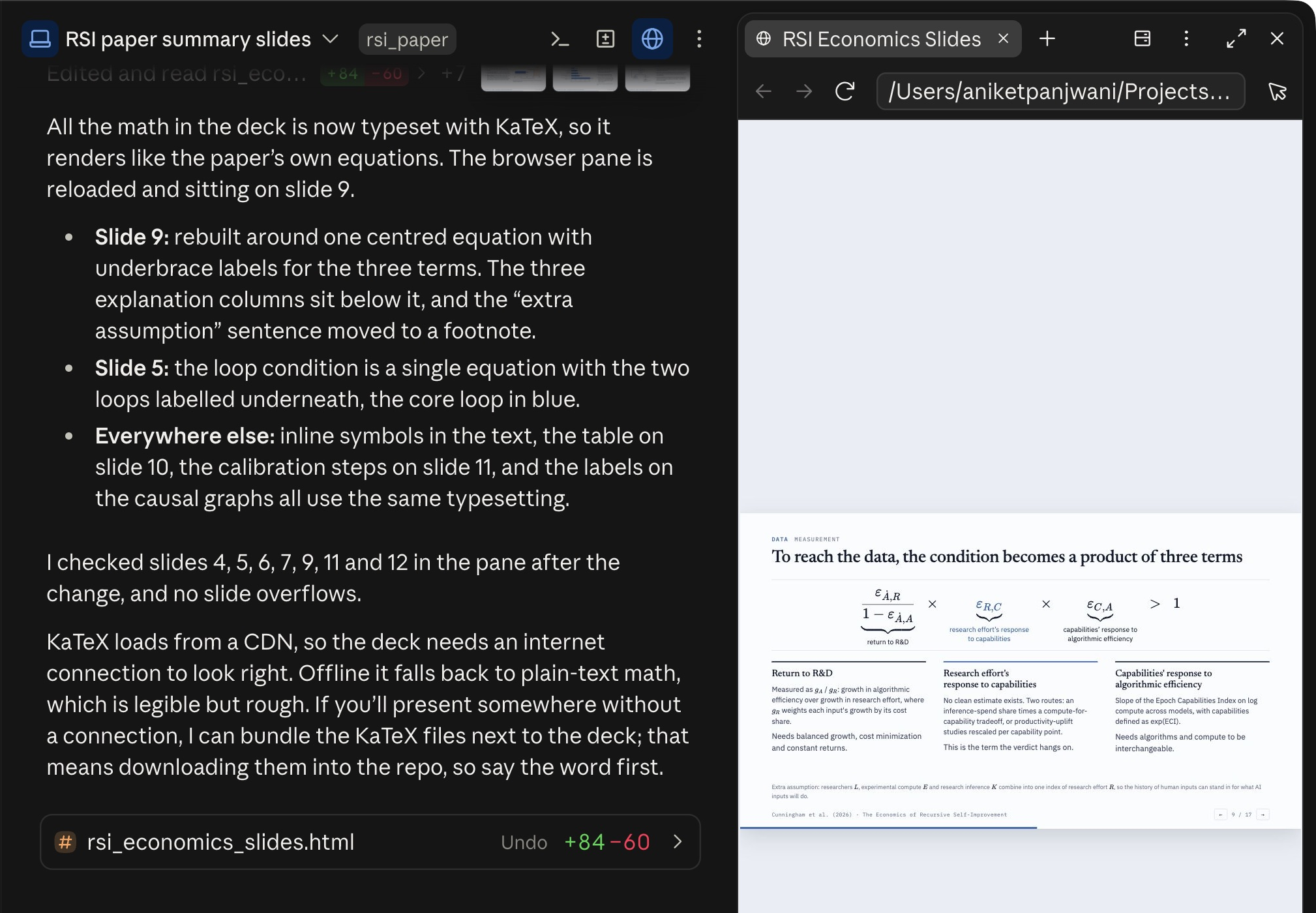
Claude Code in the desktop app, VS Code, and the terminal
Desktop app

VS Code
CLI
claude in the same sample folder, showing the same request and its reply. Not the older /context terminal capture.I recommend you use coding agents from within the desktop app. OpenAI and Anthropic continually improve their apps with useful features only available in the apps. Some examples:
- Seeing all your coding agent sessions organized by projects
- Side by side HTML viewer inside the app
- PDF viewer and annotator inside the app
- Ability to return to coding agent sessions exactly as they were after restarting their computer
- In app file editor
And many other useful features. Use the app!
Subscriptions: what do you need, and how much should you pay?
ChatGPT and Claude both come on $20, $100, and $200 per month plans. ChatGPT now has a $500 per month plan, but that's basically irrelevant for you all, because it comes with far more usage than 99% of economists will be able to make use of.
Some of you may have an EDU plan. Generally, I don't recommend depending on the EDU plan because the amount of usage provided by it is pretty minimal.
Start with a $20 per month plan if you're very budget constrained. Quickly, you'll have to move up to a $100 per month plan, and for some people that will be enough. But for a fair number of people, you'll find yourself eventually needing to move to the $200 per month plan.
Organizing your Work
Each project should have its own folder. The data, code, references, etc for that project should sit in its folder.
Typically, then - when you want to work on some project - you open a new chat in that folder.
Then, when you ask something, the agentic coding tool "knows" to search first within the context of that folder to find answers.
Ideally, you should have both your paper and your code in your project folder. Each provides context which is important for the other.
You may also want to have literature in the folder, important emails, data, and random research notes. Anything the coding agent might find useful to help you in the future.
How should you organize all of this? Ask the coding agent!
Suggested prompt: I'm working on a research project where <describe project at length>.
Here are some of the types of things which probably make sense to be inside the folder: <describe them>.
Help me figure out how to create a folder structure for this project.
Model Selection
When you're using Claude Code or Codex, you'll have an option to choose a model and an effort level.
Suggestions on both:
- In Claude Code, work primarily with Opus 5.5. Mix in Fable for tougher/more complex work.
- In Codex, use primarily GPT 6.1 Sol if you're on a $100/mo or less plan. Use GPT 6 Astra primarily if you're on $200/mo or more, but be aware that you can easily eat up your entire weeks allotment with 1-2 heavy days of coding with Astra.
- There's no hard and fast rules on the optimal reasoning effort to use. Higher reasoning efforts take longer to give results back. Generally you want to use the minimal reasoning effort which gets what you need completed.
- A good technique to develop an intuition for reasoning efforts is to start two threads for the exact same task, varying only reasoning effort, and seeing which one you prefer.
Permission Levels
A coding agent can read files, edit files, and run commands on your computer. The permission level decides which of those it may do on its own and which it has to ask you about first.
The tradeoff is between interruptions and autonomy. At the most cautious setting, the agent asks before each edit or command. At the most permissive setting, "bypass permissions", the coding agent does everything without asking for permission.
If you're starting out, I recommend the option in between that both apps now offer: an automatic review mode, where a separate reviewer model checks the actions that would otherwise need your approval and blocks the ones that look wrong. In Claude Code this is Auto. In Codex it is Approve for me.
Keeping Track of Changes
A problem you're likely to encounter early on with agentic coding tools is that they're capable of changing many files at once.
How do you safely allow agentic coding tools to work at full power without overwriting critical work?
This leads us to the next section: git
4. Git: keeping track of what changes
Git is a version control tool. It is software which helps you keep track of the precise changes made in your project. Most economists have heard of Git, and most don't use it. With coding agents, it becomes both much more important to use git and much easier to use it.
For four reasons, Git becomes more important with agentic coding tools:
- Lineage. A single result will depend on many files, and Claude Code or Codex can make edits to all of these files very quickly. Without Git, you get these horrendous directories with final.do, analysis_final_revision_v3.do, and new directories for a revision that still depend on files in the old directory. Git tracks the exact changes and lets you return to a committed version. The agent can make the commits and handle this lineage for you.
- Memory. You get an R&R, and it's been four, six, maybe more months since you've touched the project. You don't necessarily remember what you were working on and how things came about. If you've been committing your changes, this acts as memory: you can figure out which files fit together, what changed since last time, and when an error entered. You can also ask the agent for a summary of what has been worked on in the last week to prepare for a meeting.
- Effective code review. It's difficult to keep up with reading all the code being generated. Git enables a reviewer to concentrate their review on just what changed. That's useful information for a human reviewer, but also for an AI reviewer, because there are fewer tokens it needs to examine in that review step.
- Paper-code consistency. This is a conditional benefit: you need your paper in the same repository as your code. Otherwise, claims in the paper can drift from the outputs, and the agent can see the code but not the argument that corresponds to it. If you have everything in one repository, that shared context is useful: the paper explains the code, and the claims, tables, and figures stay closer together.
At the same time, Git becomes a lot easier to use with agentic coding tools because you can use the agentic coding tool to manage a lot of the Git operations. In the slides below, I map out different Git commands in terms of things that you already know.
In practice, what you need to tell Claude Code or Codex is just what you see in the "What you tell Claude Code" column in Figure 14.
When you're starting a new project, a useful practice is to simply ask something like this:
Suggested prompt: Set this project up with Git.
As we work, commit each coherent piece of work with a clear description.
A meta instruction like that is useful to have. Both tools also have project instruction files: AGENTS.md in Codex and CLAUDE.md in Claude Code. Ask the agent to put the instruction to commit your work as you go into the appropriate file in your project folder.
Each time you start a new conversation in that project, the contents of the AGENTS.md or CLAUDE.md files are read into the context window automatically. So the agent should do this basic Git operation of committing your work regularly without you needing to repeat the instruction in every chat.